From outage to restoration — one timeline
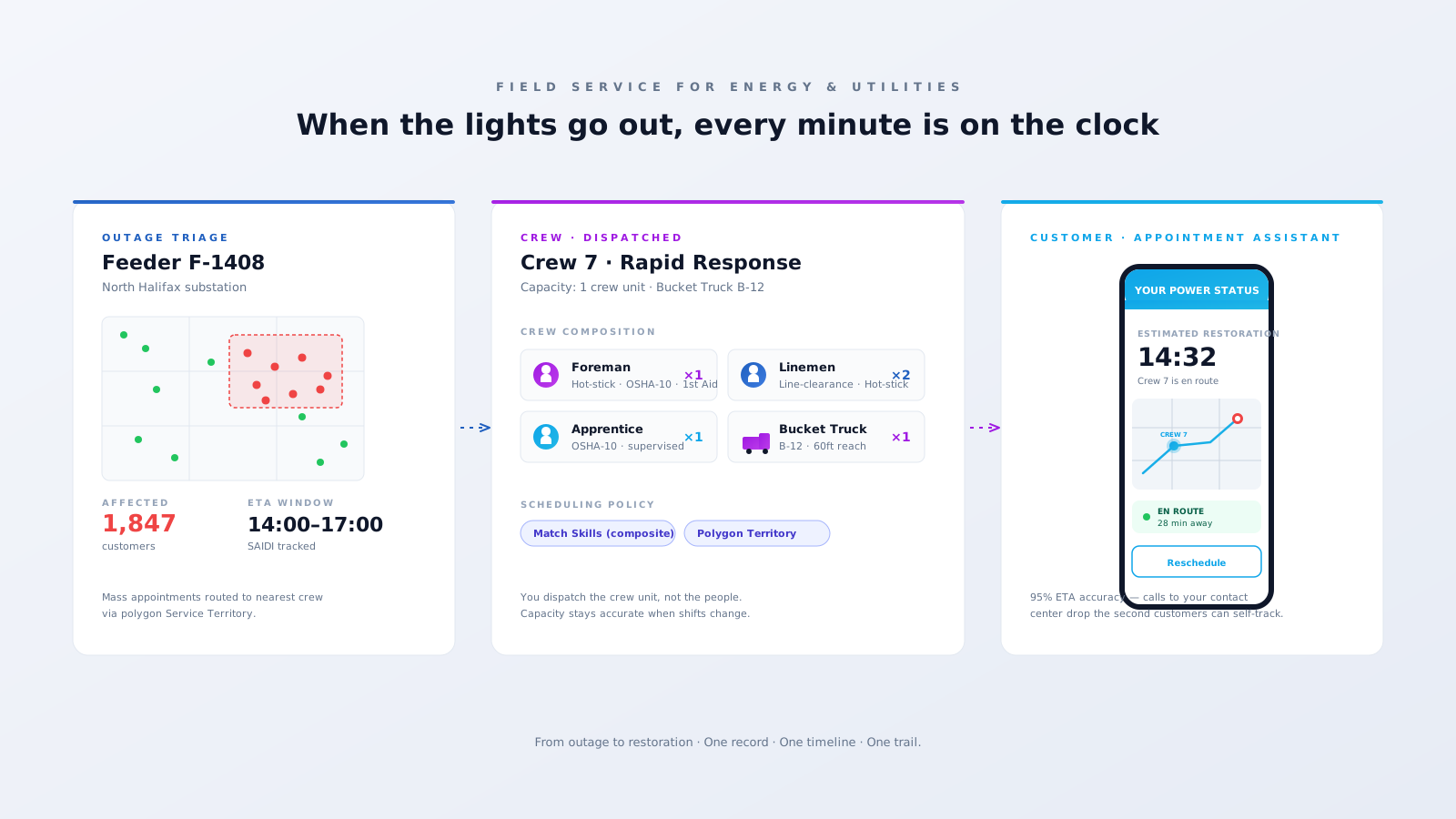
Triage in the control room. Dispatch the crew. Customer sees a real ETA.
Three problems Field Service was practically designed for.
Every minute past your CAIDI/SAIDI targets is a regulator letter and a customer-service nightmare. Without a single dispatch board, you're routing crews from spreadsheets, radios, and dispatcher memory.
Miles of right-of-way needing trim cycles, crews with line-clearance certs, weather windows, and zero room for missed inspections that turn into outages, fires, or NERC findings.
Thousands of door-to-door appointments, customers who weren't home, returning techs, and a wave of complaints any time someone misses an ETA. One bad rollout torches your CSAT for a year.
Triage in the control room. Dispatch the crew. Customer sees a real ETA.
Specific features. Specific outcomes.
Field Service models the actual crew unit (Crew object with Crew Memberships) — foreman + linemen + apprentice + bucket truck — so dispatch sees the unit's combined skills and capacity. When shifts roll over, capacity stays accurate without rebuilding rosters.
Define service territories as MapPolygons by feeder, depot, or municipality. The scheduler routes outages, restoration, and inspections to the right depot — and the hierarchy ("lowest" or "highest") rule decides what happens when urban and regional crews overlap.
Auto-generate Work Orders for tree-trim cycles and line patrols by circuit, tied to Asset records. Cycles never slip, and when the regulator asks for proof of inspection, you pull a clean record — not photos from someone's phone.
Smart-meter installs and home calls get a real ETA window, optional self-rescheduling, and live "your tech is on the way" tracking. Calls to your contact center drop the second customers can self-serve.
A working Salesforce Field Service org for a utility usually looks like this.
Polygon Service Territories by depot, feeder, and municipality with hierarchy rules wired in.
Crew Memberships with composite skills + bucket truck/equipment as Service Resources.
Maintenance Plans for vegetation, line patrols, and substation inspections — by feeder.
Skill expiry tracking on hot-stick, line-clearance, OSHA-10, and first-aid certs.
Appointment Assistant for customer-facing ETAs, reschedules, and live tracking.
Mass appointments for storm response — book hundreds in seconds.
Field Service mobile with offline forms, photos, and reading capture.
OMS & GIS integration via MuleSoft for outage feeds and circuit topology.
The wins our utility clients see once Field Service is running on real outages.
restoration time via crew-based dispatch
customer ETA accuracy with Appointment Assistant
trim-cycle compliance via Maintenance Plans
first-time-right install rate on smart meters
We'll show you what Salesforce Field Service looks like running on your real network — outage triage, crew capacity, customer ETAs. An actual configured org, not a slide deck.
Book a 30-min reviewTailored Salesforce consulting that aligns AI, automation, and CRM strategy with your goals — delivering measurable ROI at every stage.
Automate routine tasks, accelerate business processes, and reduce manual effort. Maximise efficiency and achieve your business goals through Salesforce optimisation.
Automate data entry, reduce human error, and improve data quality. Leverage Salesforce's powerful features to gain valuable insights and make informed decisions.
Eliminate manual tasks and optimise resource allocation. Streamline workflows, reduce errors, and achieve significant cost savings that improve your bottom line.
Personalise interactions, improve response times, and build stronger customer relationships. Exceed expectations and drive long-term loyalty with Salesforce AI.