Self-serve install. Cert-matched dispatch. SLA on the rails.
Customer picks the slot. Scheduler matches the certs. Entitlement Process clocks every milestone.
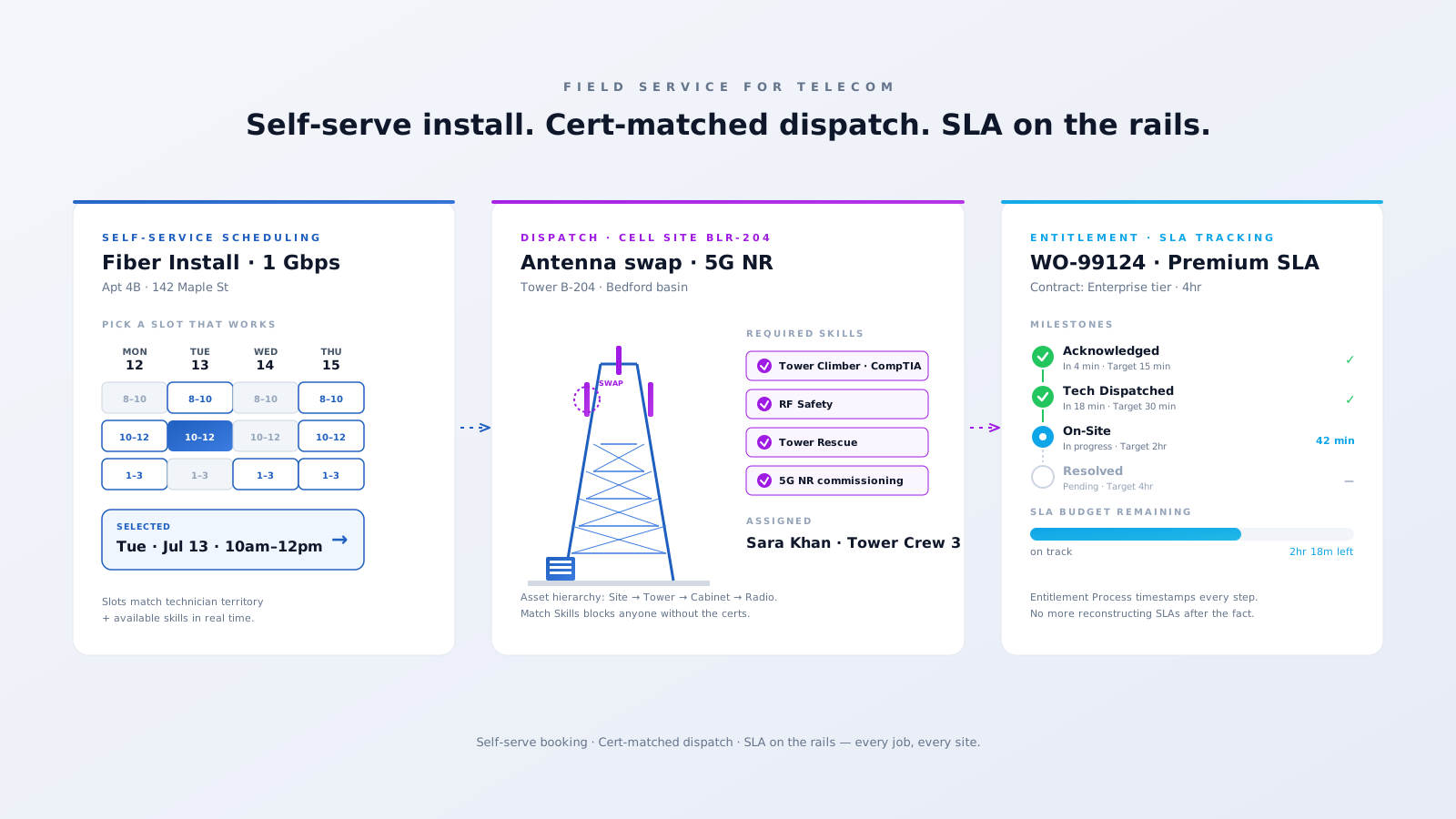
Three problems Field Service was practically designed for.
Every dispatched van that doesn't close the job first time costs you twice — once for the visit, once for the rebook. First-time-right and right-skill-on-site is the entire game.
Climber, RF Safety, Tower Rescue, fiber splicing — you can't fake your way around them. Send a tech without a current ticket and the job stops at the gate or, worse, becomes an HSE incident.
Premium-tier customers have hard SLA milestones in their contract. Reconstructing those timestamps after the fact from spreadsheets is how you end up paying credits — and losing the contract on renewal.
Customer picks the slot. Scheduler matches the certs. Entitlement Process clocks every milestone.
Specific features. Specific outcomes.
Customers pick install or repair slots from a calendar that already accounts for technician availability, territory, and skill match. The slot is booked atomically — no double bookings, no "we'll call you back".
Site → Tower → Equipment Cabinet → Radio → Antenna, modeled as Asset records with parent-child relationships. Every Work Order ties back to the exact piece of kit, so failure history and warranty status live with the asset.
Tower Climber, RF Safety, Tower Rescue, 5G NR commissioning — every cert is a Service Resource Skill with an expiry date. The Match Skills work rule keeps the scheduler from ever assigning a tech without current tickets.
Tie every Work Order to the customer's Entitlement. The Entitlement Process timestamps acknowledged, dispatched, on-site, and resolved against contractual targets — so SLA reporting writes itself, and breaches surface before they hit a credit.
A working Salesforce Field Service org for a telco usually looks like this.
Polygon Service Territories for urban / suburban / rural with overlap rules.
Asset hierarchies mirroring the network — sites, towers, cabinets, radios, antennas.
Skill expiry tracking on Climber, RF, Tower Rescue, fiber splicing certs.
Self-Service Scheduling from your customer portal or a Lightning Web Component.
Entitlement Processes for every SLA tier with milestone-level KPIs.
Appointment Assistant for live ETA and reminders to the customer.
Field Service mobile with offline access and signal-loss tolerance.
OSS / BSS integration via MuleSoft for trouble tickets and provisioning.
The wins our telco clients see once Field Service is running on real installs.
first-time-right install rate via skill-matched dispatch
truck rolls — fewer dispatch errors, fewer rebooks
SLA breach rate via Entitlement Process tracking
NPS points on consumer install — measured post-rollout
We'll show you what Salesforce Field Service looks like running on your real network — booking, dispatch, mobile, SLA. An actual configured org, not a slide deck.
Book a 30-min reviewTailored Salesforce consulting that aligns AI, automation, and CRM strategy with your goals — delivering measurable ROI at every stage.
Automate routine tasks, accelerate business processes, and reduce manual effort. Maximise efficiency and achieve your business goals through Salesforce optimisation.
Automate data entry, reduce human error, and improve data quality. Leverage Salesforce's powerful features to gain valuable insights and make informed decisions.
Eliminate manual tasks and optimise resource allocation. Streamline workflows, reduce errors, and achieve significant cost savings that improve your bottom line.
Personalise interactions, improve response times, and build stronger customer relationships. Exceed expectations and drive long-term loyalty with Salesforce AI.