Right credentials. Right time. Right patient.
Visit on the books. Clinician matched. Family sees a real person on the way.
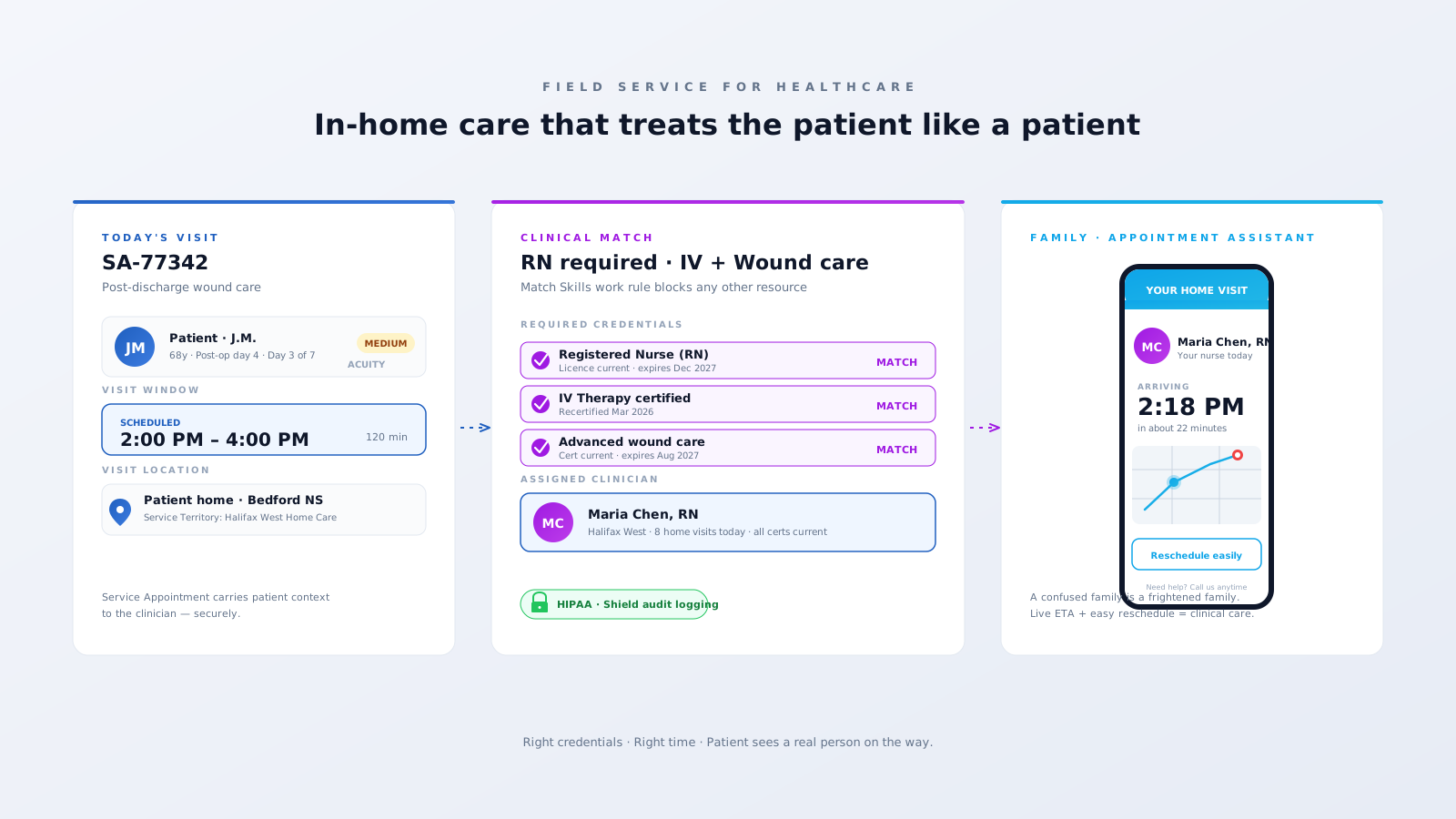
Three problems Field Service was practically designed for.
A frail patient or anxious family member sitting by the door for four hours waiting for a nurse who's running late isn't a logistics issue — it's a care issue. Real ETAs and easy rescheduling are clinical, not just convenient.
Sending an LPN where an RN is required (or any unlicensed clinician where credentials don't match) is unsafe and uncompliant. Tracking RN/LPN/RT/PT/OT certs across spreadsheets is asking for the audit you don't want.
Visit notes, vitals, photos, signatures — all of it is PHI, and every byte of it has to travel HIPAA-clean. Paper notes and personal phones are exactly how breach disclosures start.
Visit on the books. Clinician matched. Family sees a real person on the way.
Specific features. Specific outcomes.
Every credential — RN, LPN, RT, PT, OT, IV-certified, wound-care — is a Service Resource Skill with an expiry date. The Match Skills work rule blocks any assignment without current, valid credentials, and surfaces renewals before they bite.
Define MapPolygon territories aligned to clinical regions, payer networks, or care programs. The scheduler routes visits to the closest qualified clinician — and the territory hierarchy decides what happens when programs overlap.
Patient and family get a real ETA window, live tracking, and easy reschedule — sent over SMS or email straight from Salesforce. Anxiety drops, no-shows drop, complaint volume drops.
The Field Service mobile app works offline (rural visits, basement apartments) and syncs PHI through Salesforce Shield — Platform Encryption + Event Monitoring + Field Audit Trail. Compliance gets a clean trail; clinicians get a tool that works anywhere.
A working Salesforce Field Service org for in-home care usually looks like this.
Polygon Service Territories by clinical region, payer, and care program.
Skill matrix for RN, LPN, RT, PT, OT, RD, IV, wound, mental health.
Skill expiry tracking with renewal alerts ahead of licence lapse.
Maintenance Plans for chronic care visit cadences and DME service.
Appointment Assistant for patient ETA, reminders, and reschedule.
Salesforce Shield — Platform Encryption + Event Monitoring + Field Audit Trail on PHI.
Field Service mobile with offline access and PHI-safe sync.
EHR integration via MuleSoft / FHIR for visit notes back to the chart.
The wins our healthcare clients see once Field Service is running on real visits.
clinician utilization via territory + skill match
missed-visit complaints with Appointment Assistant ETAs
credential mismatches at the door — Match Skills enforces it
PHI events captured in Shield Field Audit Trail
We'll show you what Salesforce Field Service looks like running on your real home-care operation — credential matrix, regions, Appointment Assistant, Shield. An actual configured org, not a slide deck.
Book a 30-min reviewTailored Salesforce consulting that aligns AI, automation, and CRM strategy with your goals — delivering measurable ROI at every stage.
Automate routine tasks, accelerate business processes, and reduce manual effort. Maximise efficiency and achieve your business goals through Salesforce optimisation.
Automate data entry, reduce human error, and improve data quality. Leverage Salesforce's powerful features to gain valuable insights and make informed decisions.
Eliminate manual tasks and optimise resource allocation. Streamline workflows, reduce errors, and achieve significant cost savings that improve your bottom line.
Personalise interactions, improve response times, and build stronger customer relationships. Exceed expectations and drive long-term loyalty with Salesforce AI.