From the dispatch desk to the wellhead — connected
One record. One trail. One source of truth.
Three problems Field Service was practically designed for.
A compressor down on a satellite platform can cost more in deferred production than a year of preventive service. Reactive scheduling — and assets tracked across spreadsheets and dispatcher heads — makes it worse.
Send a tech without the right ticket and the job stops at the gate. Tracking BOSIET, H2S, confined space and electrical certs in spreadsheets means certs expire, jobs get bounced, and HSE has nothing clean to show the auditor.
If a technician fixed it but didn't write it up properly, regulator-wise it didn't happen. Paper service reports get lost, mis-keyed, or photographed once and forgotten on someone's phone.
One record. One trail. One source of truth.
Specific features. Specific outcomes.
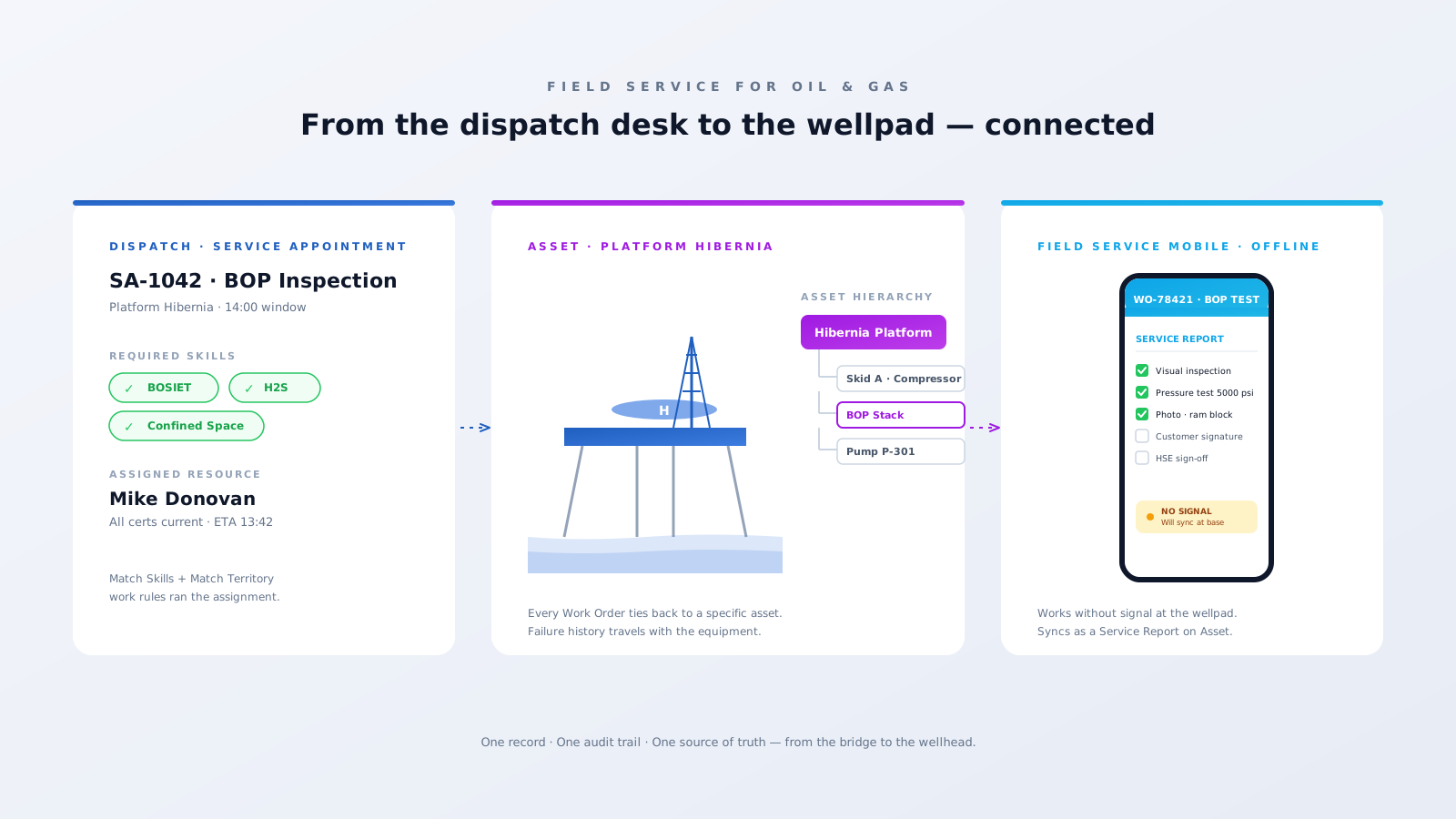
Field Service models your platforms, wells, pumps, and compressors as Asset records with parent-child relationships. Every Work Order ties back to a specific piece of equipment, so failure history, mean time between failures, and warranty status live with the asset — not in a tech's head.
Use Maintenance Plans to auto-generate Work Orders on a recurring cadence — quarterly platform inspections, BOP tests, monthly compressor checks. They land in the dispatch queue ahead of time, so nothing slips through.
Tag every certification — BOSIET, H2S, confined space, electrical — as a Service Resource Skill with an expiry date. The Match Skills work rule keeps the scheduler from ever assigning a tech without a current ticket, and surfaces who needs renewal before it bites.
The Field Service mobile app works offline (because you have no signal at the wellpad) and turns each inspection into a structured Service Report. Photos, signatures, readings, and exceptions sync when the tech is back in range — and live as audit-ready records on the Asset.
A working Salesforce Field Service org for an oil & gas operator usually looks like this.
Service Territory model by region/basin — North Sea, Gulf, Permian — with hierarchies for satellite platforms.
Asset records mirroring the equipment register: Platform → Skid → Pump, with serial numbers and warranty status.
Skills + Skill expiry tracking for every regulatory certification, with renewal alerts.
Maintenance Plans aligned to regulatory cadence — annual BOP tests, quarterly inspections, monthly checks.
Service Report templates pre-loaded with the exact fields HSE and the regulator need.
Scheduling Policy with Match Skills, Match Territory, and Resource Availability rules wired in.
Field Service mobile app with offline access and custom Lightning components for HSE checklists.
Optional IoT integration via MuleSoft or Salesforce Industries to auto-create Work Orders from sensor alerts.
The wins our clients see once Field Service is running on real assets.
unplanned downtime via Maintenance Plans + asset history
cert mismatches at the jobsite — Match Skills enforces it pre-dispatch
inspection paperwork time — 4 hours to ~20 minutes on mobile
audit pull — every inspection on every asset, end to end
We'll show you what Salesforce Field Service looks like running on your operations — not a slide deck. An actual configured org built around your assets, your crews, and your compliance reality.
Book a 30-min reviewTailored Salesforce consulting that aligns AI, automation, and CRM strategy with your goals — delivering measurable ROI at every stage.
Automate routine tasks, accelerate business processes, and reduce manual effort. Maximise efficiency and achieve your business goals through Salesforce optimisation.
Automate data entry, reduce human error, and improve data quality. Leverage Salesforce's powerful features to gain valuable insights and make informed decisions.
Eliminate manual tasks and optimise resource allocation. Streamline workflows, reduce errors, and achieve significant cost savings that improve your bottom line.
Personalise interactions, improve response times, and build stronger customer relationships. Exceed expectations and drive long-term loyalty with Salesforce AI.