The Agentforce demo is irresistible: a work order arrives, an autonomous AI agent reasons across data, assigns the right technician, and notifies them — all without a dispatcher touching anything. It's a great keynote moment. In production, the architecture that actually works is more subtle. Agentforce is genuinely useful at field-service dispatching, but it doesn't replace the FSL Optimisation engine. It sits beside it. Get that right and you ship working AI dispatch in 6–10 weeks. Get it wrong and you spend a year trying to make a chat-driven LLM solve a constraint-satisfaction problem it wasn't designed for.
Two engines. Two jobs.
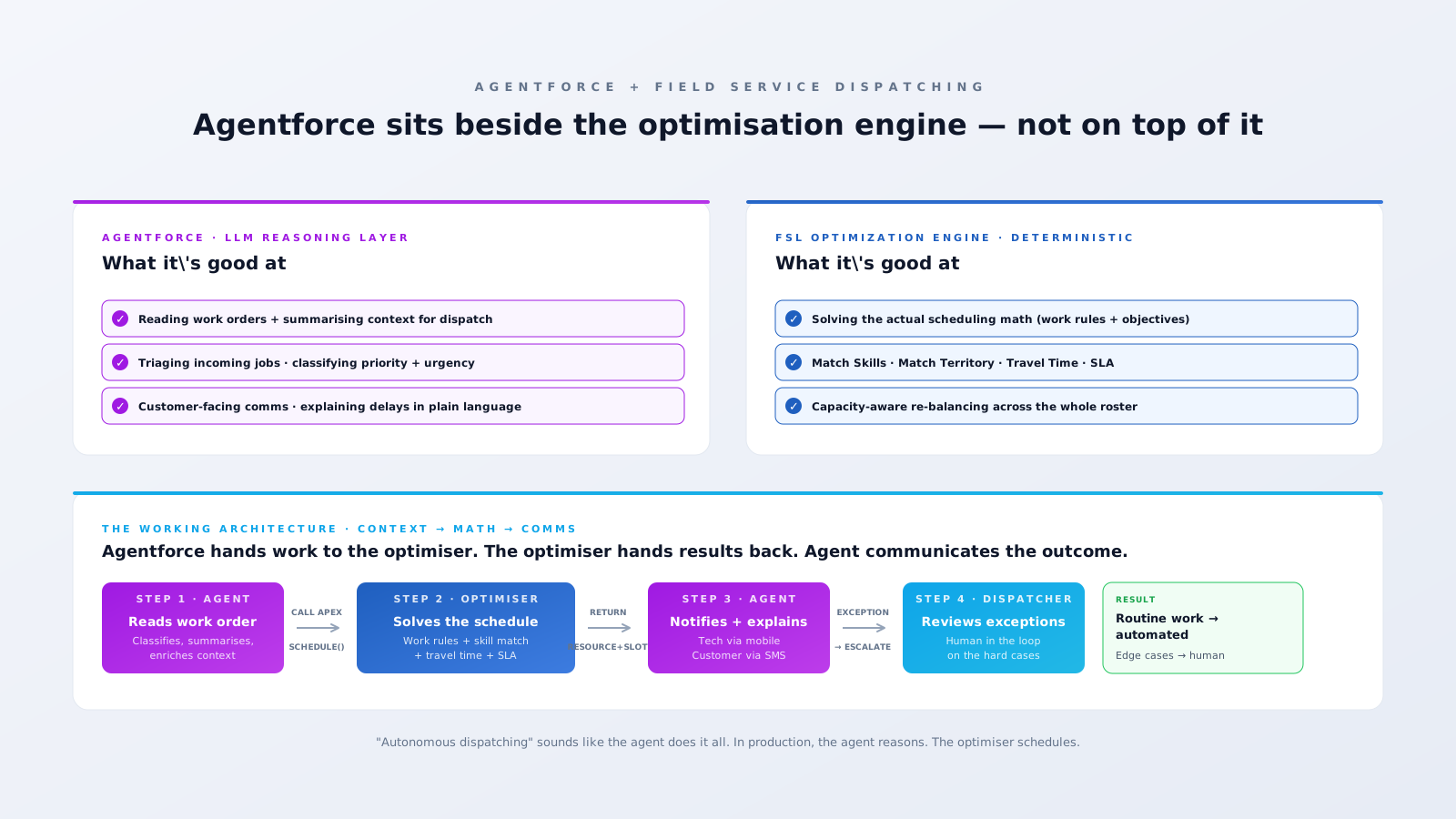
Here's the architectural truth most "Agentforce for FSL" content glosses over: Agentforce is an LLM reasoning layer. It's good at reading unstructured input, classifying intent, summarising context, calling Apex and Flow actions, and explaining decisions in natural language. The FSL Optimisation engine is a deterministic constraint solver. It's good at evaluating Match Skills, Match Territory, travel time, capacity, and SLA windows across hundreds of resources to find a feasible schedule.
You wouldn't ask the optimiser to summarise a customer email. You shouldn't ask the agent to solve the schedule. The working pattern is: Agentforce reads context and calls the optimiser. The optimiser returns an assignment. Agentforce communicates the result. Two engines, two jobs, one architecture.

What Agentforce is actually good at — in dispatching
- Reading the work order and enriching context. Customer wrote "boiler banging in the morning, smells weird, getting worried"? An Agentforce agent classifies that as urgent, suggests likely fault categories, surfaces the asset's service history, and packages it for the optimiser to schedule against the right Work Type.
- Triaging incoming jobs. Priority + urgency assessment from natural-language inputs. Routing to the right work-order queue. Flagging cases that look like SLA risks.
- Customer-facing communications. "Your technician will arrive between 2 and 4pm — here's why we needed to reschedule from this morning." That kind of human-language explanation is exactly what an LLM is built for.
- Internal explainability. When dispatch asks "why did this job get assigned to Sara?" — the agent can articulate the reasoning chain (skill match, geography, capacity) in plain English instead of a cryptic optimiser log.
What the FSL Optimisation engine still owns
- The actual scheduling math. Multi-objective optimisation across 50, 200, 2,000 resources is a constraint problem. Salesforce's optimiser does that with deterministic guarantees — every assignment honours every active work rule.
- Hard work rules. Match Skills, Match Territory, Resource Availability, Match Time Rules — these aren't suggestions. They're hard constraints. The optimiser is built to never violate them. An LLM might.
- Re-balancing the day. When a job runs over and three downstream appointments need to move, the optimiser solves the cascading shuffle in seconds. Asking an agent to "reschedule the rest of the day" is asking it to solve a problem it isn't architecturally suited for.
The production architecture, in five steps
- Inbound trigger. A Service Appointment is created (case escalation, IoT alert, customer self-serve booking, recurring Maintenance Plan). Standard FSL.
- Agent reads + enriches. An Agentforce agent reads the appointment context, fault description, customer history, asset history, and any free-text notes. It outputs a structured payload: Work Type, Required Skills (resolved against your skill taxonomy), Priority, SLA Window.
- Agent calls the optimiser. Through an exposed Apex action (or Flow), the agent asks the optimiser to schedule the appointment. The optimiser returns either an assignment (resource + slot) or an exception ("no qualified resource available within SLA").
- Agent communicates the outcome. Tech gets a mobile push with a summarised brief. Customer gets an SMS with the appointment window. Dispatcher dashboard updates. Slack channel post if it's an emergency.
- Exception path. If the optimiser couldn't schedule, the agent escalates to a human dispatcher with a written explanation of why — not a row in an exceptions table that nobody reads.
Five gotchas that don't make the keynote
1. Agentforce isn't free. Agentforce is billed per action — actions are conversation turns and tool invocations. A high-volume dispatch operation can rack up thousands of agent actions per day. Forecast the cost before you architect for full autonomous flow. Some teams find the right ROI is "agent triages and explains, but a human approves the schedule" — not full unattended.
2. The Atlas Reasoning Engine adds latency. An agent action goes from the Salesforce platform → Atlas → an LLM → back. End-to-end latency is typically 1–4 seconds per agent step. For an emergency dispatch flow you want sub-second decisions, that compounds. Architect with timeouts and a deterministic fallback path for time-critical work.
3. Hallucination risk on schema-loose actions. If your agent calls a "create Work Order" Apex action without strict schema validation, an LLM can hand back inputs that look right but reference resources, territories, or skills that don't exist in your org. Validate everything the agent passes into platform actions — treat the LLM as an untrusted client.
4. The Trust Layer doesn't compensate for bad prompts. Salesforce's Einstein Trust Layer handles PII masking, content moderation, and audit logging. It doesn't fix the case where your agent's system prompt is vague enough to let it suggest violating a work rule. Prompt engineering is a real engineering discipline, not a copywriting task.
5. "Autonomous" usually means "supervised in practice." Most production deployments don't run truly unattended. They run with the agent making routine decisions and a human reviewing edge cases. The 30–40% dispatcher-workload reduction headline is real — but it's 30% off a base where humans still own the hard 10%. Plan operations around that, not around the keynote video.
Where Agentforce most clearly earns its keep
- High-volume, low-complexity dispatch. Telco install runs, smart-meter rollouts, residential service calls. Lots of similar jobs, clear skills, clear territories. The agent triages and the optimiser schedules.
- Customer-facing communications. Reschedule explanations, ETA updates, post-visit summaries. The agent shines when the output is natural language.
- Exception triage and explainability. When the optimiser can't schedule something, the agent generates a written explanation for the dispatcher: "no resource within SLA had Skill X — closest match is Sara, but she's on a job until 3pm. Recommend assigning Sara to this and re-routing her current job to Owen."
Where Agentforce won't pay back yet
- Time-critical emergency dispatch (under 1-minute response targets). The Atlas latency hurts here. Use the optimiser directly with rule-based escalation.
- Highly regulated dispatch where every assignment needs audit-grade reasoning. Deterministic rules + Field Audit Trail beats an LLM that "explained its reasoning."
- Operations with brittle data. Agentforce amplifies what's already in your data. If your skill taxonomy is half-built and your asset records are empty, no amount of LLM reasoning will fix that. Architecture first, AI second.
Bottom line
Agentforce isn't replacing the FSL Optimisation engine — it's wrapping it. The architecture pattern that ships works like this: agent reads + enriches + escalates + explains; optimiser schedules. Decide which side of that fence each part of your dispatch flow lives on, and the implementation gets straightforward. Skip the architectural decision and you'll spend a year trying to bend an LLM into a constraint solver.
If you're evaluating Agentforce for dispatch and want a vendor-neutral take on whether it's right for your operation, a short architecture review is usually worth more than another vendor demo. Or book a 30-minute working session if you want to talk through the specific dispatch patterns you're trying to automate.