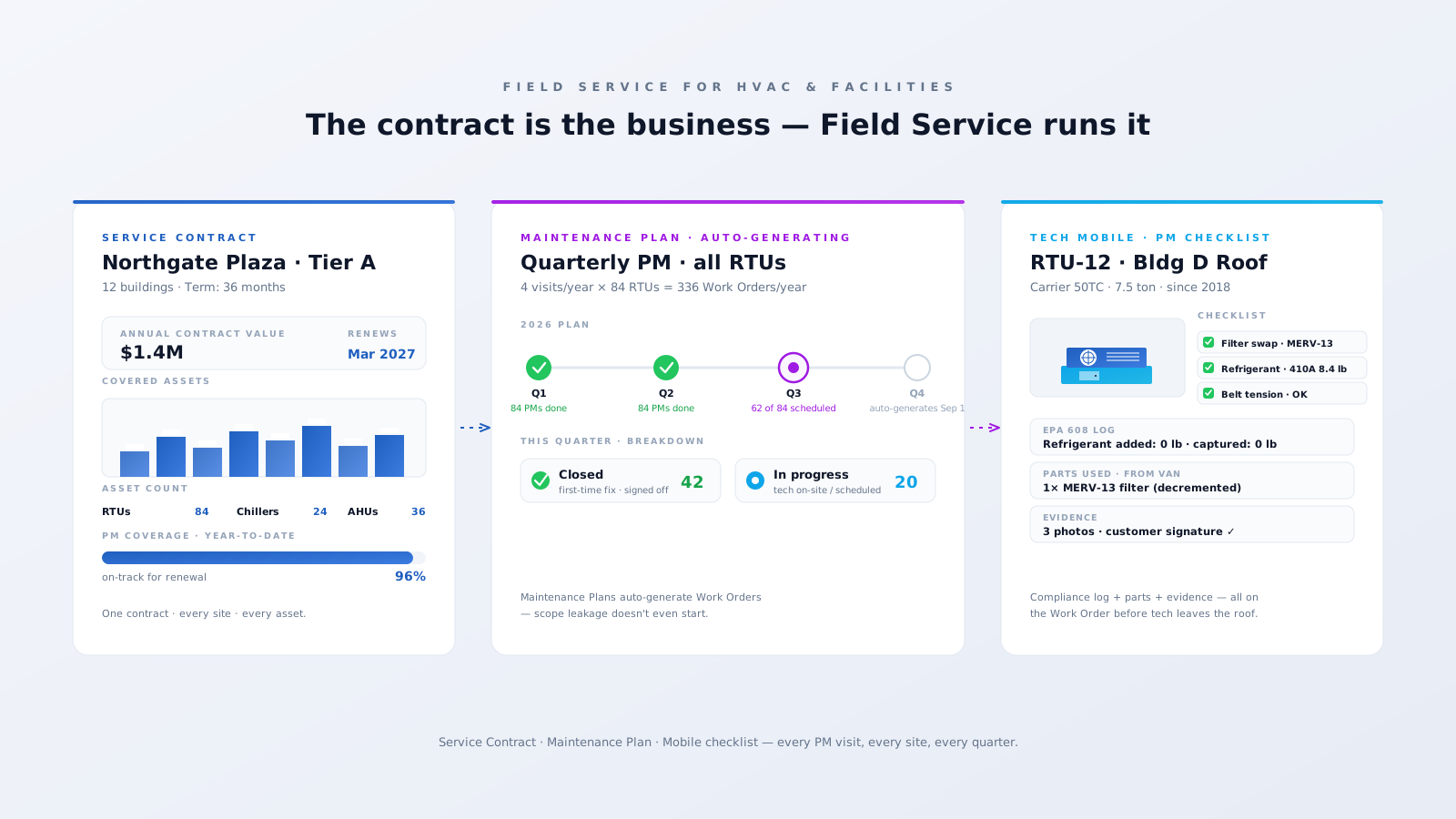
Service Contract → Maintenance Plan → Mobile checklist
Every PM visit, every site, every quarter — generated, dispatched, and signed off.
Three problems Field Service was practically designed for.
Quarterly filter changes, refrigerant checks, belt inspections — easy to miss when they live in spreadsheets. Customer notices when their air goes out in August, and the renewal conversation gets ten times harder.
A property manager owns 40 sites with 600 RTUs. Without a unified asset book, every emergency call starts with "what's actually on that roof?" — wasting half the visit before the work begins.
Refrigerant logs, leak rates, technician certifications — the paperwork is the compliance posture. Lose the log book, lose the audit, lose the licence.
Every PM visit, every site, every quarter — generated, dispatched, and signed off.
Specific features. Specific outcomes.
Every Service Contract drives Entitlements that drive Maintenance Plans. PM visits auto-generate as Work Orders for every covered Asset on the right cadence — quarterly, semi-annual, annual. Scope leakage doesn't even start.
Account → Site → Building → Roof → RTU/Chiller/AHU → Components, modeled as Asset records with parent-child relationships. Every emergency call starts with the unit's full history — not "what's on that roof?".
Custom Lightning components on the Field Service mobile app turn each PM into a structured checklist with photos, refrigerant log fields, parts consumed from van stock, and customer signature. Signed off before the tech leaves the roof.
Property managers and facility leads log in to a portal to raise emergency calls, see open Work Orders, view PM history, and get an Appointment Assistant ETA when the tech is on the way. Calls into your dispatch desk drop overnight.
A working Salesforce Field Service org for an HVAC contractor or facilities operator usually looks like this.
Service Contracts + Entitlements with PM coverage, response times, and renewal dates.
Asset hierarchy for each customer site with serial, manufacturer, install date, and warranty.
Maintenance Plans per Asset with cadence, work template, and skill profile.
Skill matrix — HVAC tech, EPA 608 (Type I/II/III/Universal), boiler, controls.
Mobile-first PM checklists with refrigerant log + parts + photo + signature.
Mobile inventory — Product Item, Product Request, Product Transfer for van stock.
Experience Cloud portal for property managers — service requests, history, ETAs.
Appointment Assistant for live ETA on emergency calls.
The wins our HVAC and facilities clients see once Field Service is running on real contracts.
PM coverage — Maintenance Plans never miss
contract renewal rate via clean PM history
first-time fix on emergency calls via Asset 360
EPA refrigerant log captured at the Work Order
We'll show you what Salesforce Field Service looks like running on your real contracts — every site, every asset, every PM visit. An actual configured org, not a slide deck.
Book a 30-min reviewTailored Salesforce consulting that aligns AI, automation, and CRM strategy with your goals — delivering measurable ROI at every stage.
Automate routine tasks, accelerate business processes, and reduce manual effort. Maximise efficiency and achieve your business goals through Salesforce optimisation.
Automate data entry, reduce human error, and improve data quality. Leverage Salesforce's powerful features to gain valuable insights and make informed decisions.
Eliminate manual tasks and optimise resource allocation. Streamline workflows, reduce errors, and achieve significant cost savings that improve your bottom line.
Personalise interactions, improve response times, and build stronger customer relationships. Exceed expectations and drive long-term loyalty with Salesforce AI.