Most teams in Salesforce Field Service reach for Crews the first time a job needs more than one technician. It feels right — group your people, dispatch the unit, done. Then six months in, the rigidity bites: an apprentice can't pick up a small job because the crew is locked together; a phased install ties up a foreman for a whole day when she's only needed for two hours; a Complex Work Order won't assign to a Crew at all. The choice between Crew and Complex Work Order isn't a feature comparison. It's a data-model decision that determines what your scheduling engine can and can't do — and most of the gotchas don't show up in the official docs until you've already built the wrong thing.
The two data models, in plain language
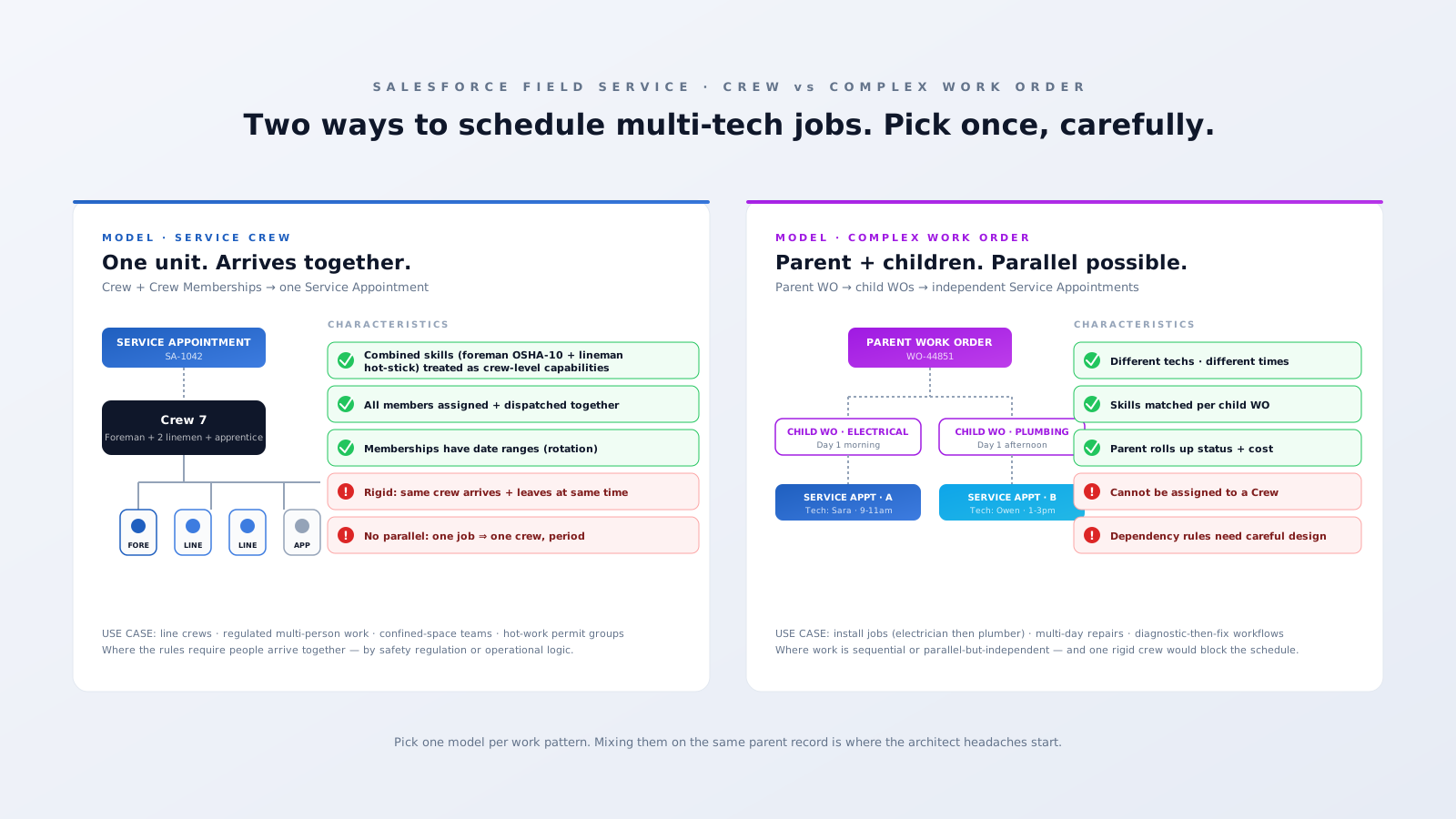
A Service Crew is a Salesforce object (ServiceCrew) with members joined via a ServiceCrewMember junction. The members can be Service Resources or equipment (a bucket truck, a CT scanner cart). Crucially, ServiceCrewMember records carry start and end dates — so people rotate in and out of crews over time. When you assign a Service Appointment to a Crew, the scheduling engine treats the entire crew as one schedulable unit: the combined skills of all active members on the appointment date are evaluated together; everyone is dispatched together; everyone leaves together.
A Complex Work Order is a parent WorkOrder with child WorkOrder records (or WorkOrderLineItem records). Each child gets its own Service Appointment, its own skill requirements, its own time slot, and its own technician. The parent rolls up status, cost, and SLA, but each child schedules independently. You can sequence the children with dependency rules (Step 2 unlocks when Step 1 is signed off) or run them in parallel.
That difference — one schedulable unit versus several independent ones — is the entire architect decision in a single sentence.

Three differences that actually decide it
1. Skill-matching evaluates differently. Match Skills on a Crew job evaluates the combined skill set of the active crew membership against the required skills on the appointment. So a crew with Foreman (OSHA-10) + 2 Linemen (Hot-Stick) + Apprentice qualifies for a job needing both OSHA-10 and Hot-Stick — the engine adds them together. On a Complex Work Order, Match Skills runs per child: each child Service Appointment is matched against an individual Service Resource. There's no aggregate. If the work needs Skill A and Skill B at the same time on one child appointment, you need a single resource who has both — or you split it into two children.
2. Time and place are coupled or decoupled. Crews are time- and place-coupled. The whole crew arrives at one location at one time and leaves together. Complex Work Orders decouple both. Child A can run from 9–11am at one site; Child B can run from 1–3pm at the same site (or a different one). A network-upgrade Work Order with four child WOs across four cabinets in the same metro can be scheduled to four different technicians starting at four different times.
3. Capacity counts differently. A Crew is one schedulable resource — its capacity is one. So even a four-person crew can't take two jobs simultaneously. Complex Work Orders multiply capacity: four parallel child WOs assigned to four different technicians give you four units of throughput on one parent project.
The "you can't mix them" gotcha
Here's the rule that catches teams six weeks into a build: a Service Appointment on a Complex Work Order child cannot be assigned to a Crew. Salesforce's scheduling engine treats Crew assignment and Complex parent-child relationships as alternative scheduling primitives — not stackable ones. If your design has a parent WO that breaks into 3 child WOs, and you want one of those children handled by your line crew? The engine won't let you. You either model the whole job as a Crew assignment (with a single Service Appointment, no children), or you model it as Complex with each child going to an individual Service Resource.
The architect-level workaround when you genuinely need both — a multi-day project with one phase requiring a regulated crew and other phases handled by individuals — is to keep them in separate parent Work Orders linked by a custom relationship field. You lose the native parent-rollup, but you preserve schedulability. Custom Apex or Flow stitches the SLA reporting back together. It's the kind of design choice you want to make at week one of a build, not week twelve.
When to use Crew
- Regulation requires people on site together. Confined-space entry teams (one entrant + one attendant + one supervisor by OSHA), hot-work permit teams, lifting/rigging crews where a competent person must be present.
- The work is genuinely indivisible. Pulling cable into conduit, two-person stretcher transport in healthcare, scaffolding erection — the work physically needs all hands at once.
- The composition is stable. Same foreman + same apprentice three days a week. Crew Memberships absorb the day-to-day rotation cleanly.
When to use Complex Work Orders
- Sequential trades. Electrician runs first-fix, plumber follows, finishing trade closes out. Each child WO is its own appointment, its own skills, its own date.
- Diagnose-then-fix. A Level-1 tech opens, scopes, captures photos. A Level-2 specialist returns with the right parts. With dependency rules, the Level-2 child auto-unlocks when Level-1 closes.
- Multi-site projects rolling up to one job. A telco network upgrade with one parent WO and four child WOs across four cabinets — schedulable independently, billable as one engagement.
- Compliance work where only one phase needs the certification. Healthcare device installation: the biomed-certified engineer commissions, but cable routing and network connectivity don't need that cert. Don't waste the certified resource on prep work — split the children.
Common architect mistakes we see in the wild
Putting everyone in a single big Crew "to make scheduling easier." Then the apprentice can't pick up small standalone jobs because they're permanently locked into a crew that isn't scheduled. Crews work best lean and stable, not as ops-wide convenience.
Using Complex Work Orders for line-crew work. A four-person line crew responding to an outage is one team arriving at one feeder. If you model it as four child WOs, the optimization engine can split them across the day or send them to different feeders. The data model has to match the operational reality, or the scheduler will quietly make decisions you didn't plan for.
Assuming Crew Memberships are static. They're not — each member record has a start and end date. If you onboarded a tech to a crew last year and never set the end date, then sent them on parental leave, the engine still considers them an active crew member. Their unavailability propagates to every crew job. Audit your ServiceCrewMember records as part of monthly platform health.
Bottom line
Crew and Complex Work Order are answers to different operational questions. Crew is "this work needs the same group of people present together." Complex is "this work breaks into discrete pieces that can be scheduled by different people at different times — but reports as one project." Pick by what the work actually requires, not by what feels easier to administer.
If you're partway through a build and the design feels wrong, that's often a signal you started with one model and ran into the rigidity of the other. Worth a 2-hour architecture review before you sink another sprint into the wrong primitive — or book a 30-minute working session if you want to talk through your specific job-type taxonomy.