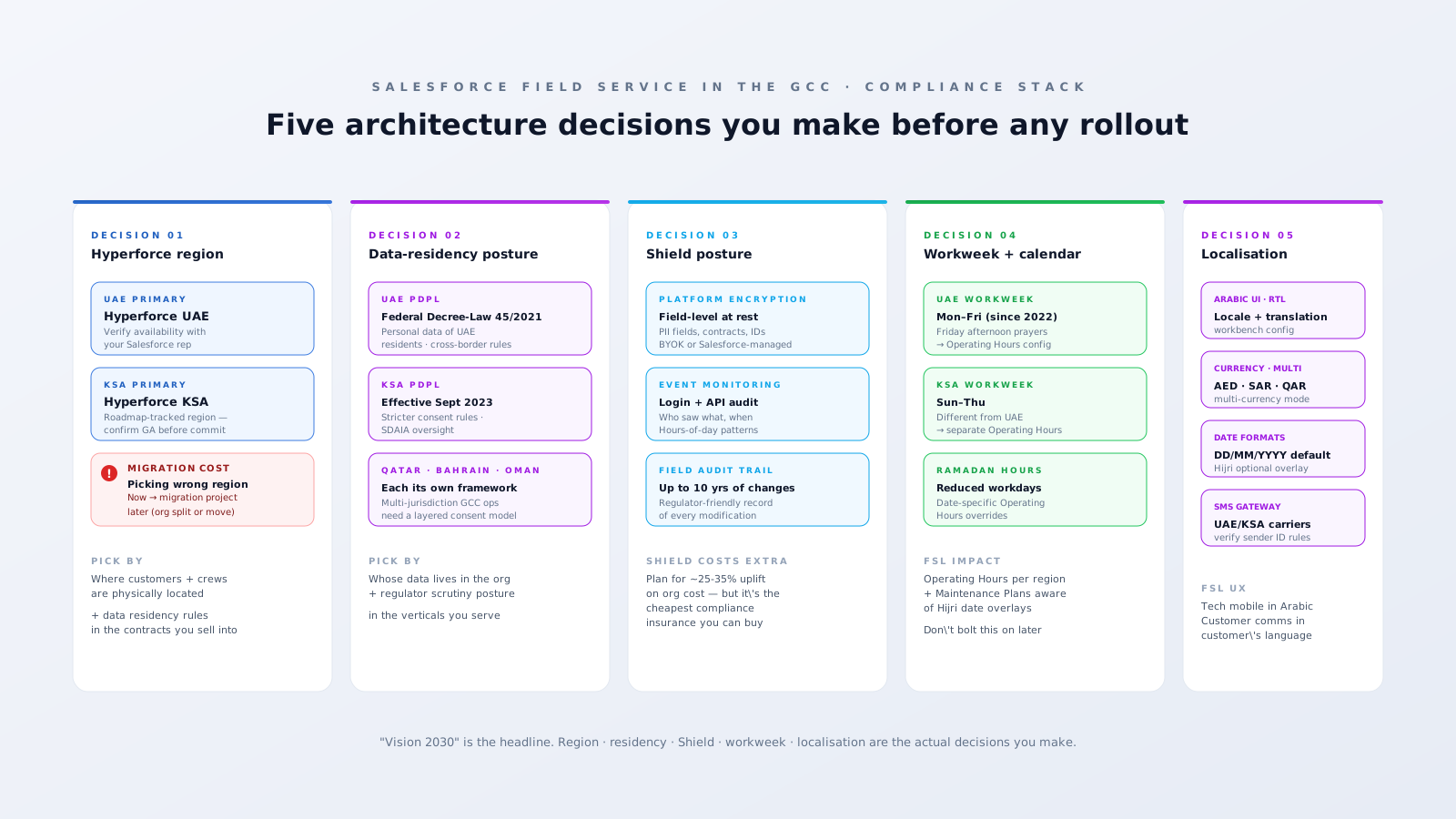
Salesforce Field Service rollouts in the GCC always start with the Vision 2030 pitch — digital transformation, smart cities, AI-enabled service, regional ambition. All true. None of it is the hard part of the build. The hard part is five architectural decisions that get made in the first week of any GCC implementation, are expensive to reverse, and barely show up in the marketing material: Hyperforce region selection, data-residency posture, Salesforce Shield configuration, workweek and calendar config, and the localisation layer. Get those right and the rollout is fast. Get them wrong and you spend year two unwinding decisions you made on day three.
This is the technical companion to our GCC practice page — the architecture decisions before any of the GTM happens.

Decision 1 — Hyperforce region selection
Salesforce Hyperforce is the architecture that lets your Salesforce org physically live in a specific public-cloud region. For GCC operators this is the foundational decision: which region does your org sit in? Hyperforce UAE is generally available; Hyperforce KSA is on the published roadmap and has been rolling to additional customers — verify availability with your Salesforce rep before you commit, because availability changes quarter-by-quarter.
The architectural mistake that costs you is picking the wrong region at signup. If you provision your org in EU-West because the team is comfortable with it, then a year later need data residency in UAE because of a major customer's contract, you're looking at a Salesforce-managed migration project — measured in months and meaningful cost, not days. Architect for where your customer data and field crews physically operate, not where the IT team is most comfortable.
The decision is binary at signup but plural across the GCC. Multi-country GCC operations sometimes need org-per-country architecture (different orgs for UAE vs KSA vs Qatar), with cross-org integration via Salesforce Connect or MuleSoft. That's heavier but it's the only fully-clean answer when residency rules differ.
Decision 2 — Data residency posture
The GCC privacy framework is now stitched together from several national laws, and each has its own teeth:
- UAE PDPL — Federal Decree-Law No. 45 of 2021, effective January 2022. Covers personal data of UAE residents. Cross-border transfer requires either an adequacy decision, contractual safeguards, or explicit consent.
- KSA PDPL — effective September 2023. Stricter consent requirements. Oversight by the Saudi Data and AI Authority (SDAIA). Cross-border transfer is more tightly controlled than UAE.
- Qatar PDPL — Law No. 13 of 2016. Earlier framework, narrower scope, but real.
- Bahrain — PDPL effective 2018.
- Oman — Personal Data Protection Law 2022.
For Field Service specifically, the personal data at stake is mostly: customer contacts on Accounts and Service Appointments, technician data on Service Resources, and Service Report content (which can include photos of customers' premises and signatures). All of that needs to live somewhere a regulator wouldn't object to.
The architectural decision: does your data residency story extend through every integrated system? Hyperforce keeps the Salesforce data in-country, but if your MuleSoft connects to an ERP in Singapore, or your reminder SMS is sent via a Twilio account in the US, you're creating cross-border flows the regulator may scrutinise. Map the full data flow before contracts are signed; this is exactly what UAE/KSA enterprise customers will ask in procurement.
Decision 3 — Shield posture
Salesforce Shield is the optional add-on that gives you three things you almost certainly want for GCC compliance: Platform Encryption (field-level encryption at rest), Event Monitoring (a log of every API call, login, report run, and field access), and Field Audit Trail (long-retention historical record of every change to a tracked field, up to 10 years).
For a GCC FSL rollout in healthcare, finance-adjacent service, or government-facing utilities, Shield is the cheapest compliance insurance you can buy. Cost roughly: 25–35% uplift on the per-user cost of the underlying licences — verify with your Salesforce rep, since Shield pricing is usually quote-based and varies by edition. The architectural decision isn't really "Shield or not Shield" for regulated GCC verticals — it's "which fields and which retention periods."
Specific Shield decisions to make in week one:
- Which PII fields are encrypted? (Default: Contact email/phone, Service Appointment notes, Service Report customer signatures.)
- Bring-Your-Own-Key (BYOK) or Salesforce-managed keys? BYOK gives you stronger sovereignty but you assume key-loss responsibility — get the operations playbook in place before turning it on.
- Which objects get Field Audit Trail enabled? (Common: Service Appointment, Work Order, Service Resource, Asset, Service Report. Each enabled object has a retention cost.)
- What Event Monitoring transformations? Most teams pipe Event Monitoring data into Splunk or Tableau CRM for query-friendly access, not the raw API endpoint.
Decision 4 — Workweek and calendar config
The GCC workweek isn't Mon-Fri. UAE moved to Mon-Fri in 2022 with Friday afternoons off for prayers. KSA remains Sun-Thu. Qatar, Bahrain, Oman, Kuwait each have their own variants. The Salesforce Field Service primitives that get configured around this:
- Operating Hours records — one per region, reflecting that region's working days and times. UAE Operating Hours ≠ KSA Operating Hours. The scheduling engine respects whichever is on the Service Territory.
- Service Resources / Shifts — when techs work. Per-region patterns. Shift Patterns can be set up to honour Friday half-days or Sunday standby.
- Maintenance Plans — recurring work needs to skip non-working days. Easy when Operating Hours are right; painful when you tried to bolt it on later.
- Holiday calendars — Eid Al-Fitr, Eid Al-Adha, National Day, Ramadan reduced hours. These move year-by-year on the Hijri calendar. Build a maintained holiday calendar object that overrides Operating Hours on those dates rather than hand-coding every year.
The architectural mistake: configuring Operating Hours on a single global default and then patching it region-by-region. Far cleaner to build a per-territory Operating Hours record from day one. Cheap now, painful retrofit.
Decision 5 — Localisation
Salesforce supports Arabic natively, including right-to-left UI. The decisions to make:
- User locale. Set per-user. Tech mobile app renders in their preferred language. Common GCC mix: Arabic + English + Hindi/Urdu (for South-Asian field workforce). Configure all three at the user-record level.
- Customer-facing language. Driven by
Contact.LanguageLocaleKey. Customer reminders, Appointment Assistant pages, Experience Cloud portal — all should render in the customer's preferred language. - Translation Workbench. For custom field labels, picklist values, and Lightning component strings. This is real engineering — plan for it during the build, not after.
- RTL behaviour. Arabic UI flips right-to-left, including report layouts, table columns, and (importantly) custom Lightning Web Components. Test custom UI in RTL early; it surfaces layout bugs that don't show up in LTR testing.
- Multi-currency. AED, SAR, QAR, KWD, BHD, OMR. Multi-currency mode on the org needs to be enabled at provisioning — adding it later is non-trivial. Decide on the parent currency for reporting before contracts are signed.
- Date formats. DD/MM/YYYY default for most GCC. Hijri overlay only where the business genuinely runs on Hijri (rare in private sector, common in government).
- SMS gateway sender ID. UAE TRA and Saudi CITC have specific rules about pre-registered sender IDs and message templates for marketing/transactional traffic. Build this into your Twilio (or local provider) configuration before the first reminder fires.
A pragmatic build order
- Region first. Confirm Hyperforce availability with Salesforce. Architect by where the customer data physically lives — not where the team is comfortable.
- Data residency next. Map the full data flow including integrations. Match it against the PDPL of every jurisdiction you operate in.
- Shield third. If regulated vertical, turn on Shield from day one. Decide which fields and which retention periods. BYOK only when you have the key-management ops in place.
- Workweek + calendar. Per-territory Operating Hours from week one. Holiday calendar object. Multi-currency mode on at provisioning.
- Localisation. Translation Workbench for custom strings. Test RTL early. SMS gateway sender ID configured before the first send.
- Then — and only then — start building Field Service. Service Territories, Resources, Skills, Maintenance Plans, all of it. The compliance + locale stack is the foundation; FSL config is the building on top.
The mistake we see most
"We'll do FSL first and figure out compliance / locale / region during go-live." This is the architectural equivalent of pouring concrete before laying the rebar. Every one of these five decisions has follow-on effects that touch every Service Territory, every Operating Hours record, every Customer email, every regulator question. Build them in week one, sleep well in year two.
If you're scoping a GCC FSL rollout and want the architecture decisions independently reviewed before they're locked in — architecture and advisory is exactly the engagement built for this. Or book a 30-min working session if you just want a vendor-neutral read on which of the five decisions you're likely to fall over.