First-time fix rate is the cleanest performance metric in field service: did the technician resolve the customer's issue on the first visit, or did you have to send someone again? Industry consensus puts the average around 70–75% across most verticals. Top performers run 85%+. Closing that 10–15-point gap is one of the highest-ROI improvements available — every avoided second visit saves you 1.5–2× the cost of the first, plus the customer-satisfaction hit a return represents.
The pitch you keep hearing is that AI is what closes that gap. Einstein predicts parts. Agentforce surfaces Knowledge. The mobile app gives the tech an answer in real time. All of that is real and useful — and it's not the lever that moves the most FTFR points. The boring stuff does. AI is the multiplier on a working foundation, not a substitute for one.
The four levers that actually move FTFR

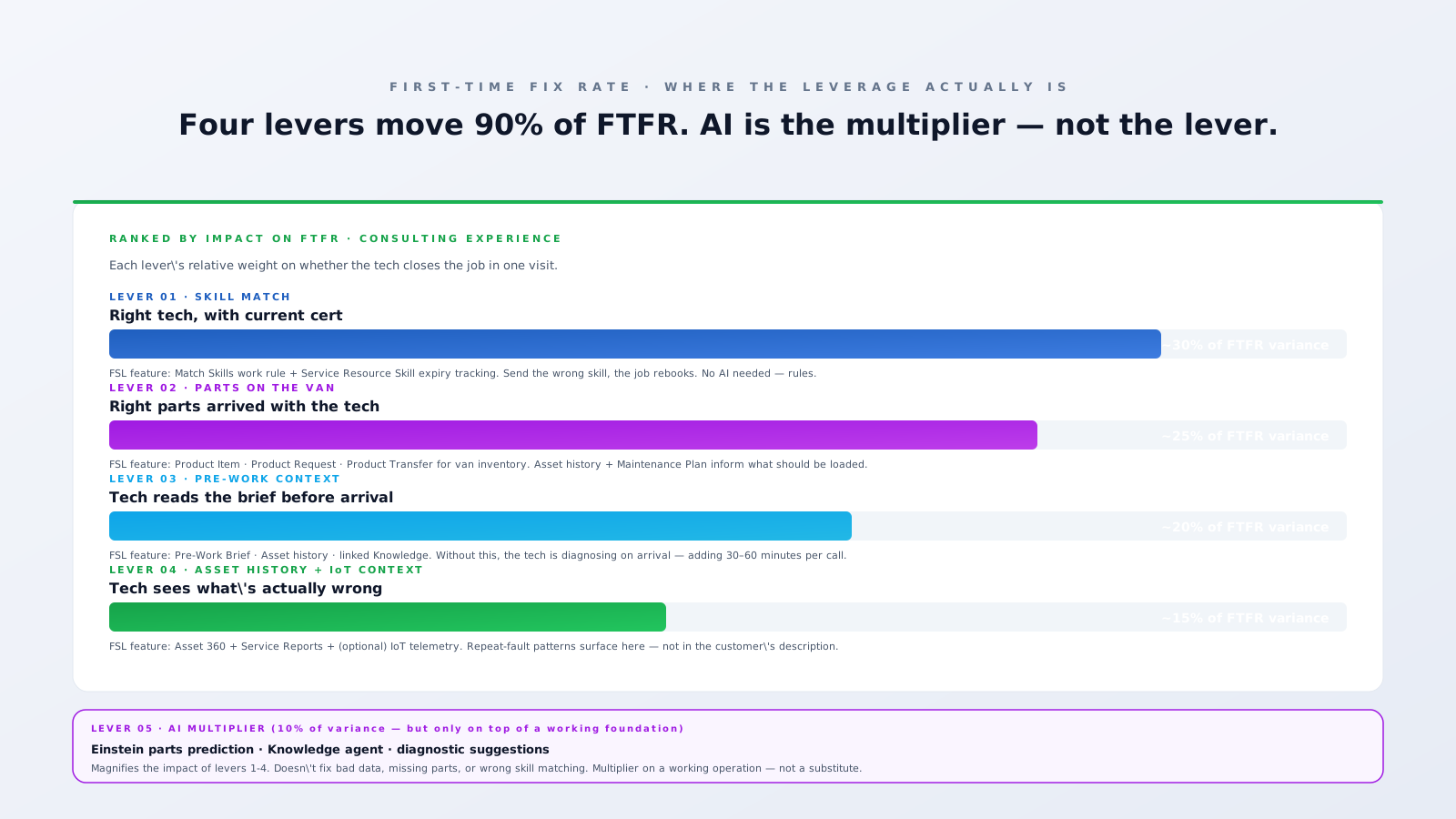
From shipping FSL implementations across utilities, telecom, manufacturing, and HVAC, the levers rank consistently. Numbers below are illustrative — your operation will weight them differently — but the order is reliable.
Lever 1 — Skill match (~30% of FTFR variance)
The single biggest cause of repeat visits is the wrong skill on site. A tech who can diagnose but can't handle the certified repair leaves and comes back with a colleague. A junior dispatched to a job needing senior judgement gets stuck. A tech with an expired certification can't legally close the work and has to rebook.
The Salesforce primitive that fixes this is the Match Skills work rule, paired with Service Resource Skills tagged with expiry dates. The work rule is hard, not advisory — it blocks scheduling against any resource without the required skill or with an expired certification. There's no AI involved. It's a configuration step.
The architect-level upgrade: tag Skill Levels so the engine doesn't just match presence of a skill but also seniority. Sending the most senior available tech to a high-complexity Work Type increases first-time fix dramatically — at the cost of utilisation, which you tune via the Scheduling Policy. The trade-off is real and live in the platform; it's a config decision.
Lever 2 — Right parts on the van (~25%)
The tech arrives, opens the unit, finds the failure, and discovers the replacement part isn't on the truck. Job rebooks. This is one of the most depressing repeat-visit causes because it's also the most preventable.
Salesforce Field Service models van inventory through Product Item (what's on each van), Product Request (what should be), and Product Transfer (movement between depot and van). With a clean Asset register and Service Reports captured per visit, you can build a parts-loaded-vs-parts-actually-used picture that surfaces the gap quickly.
This is also where AI starts earning its keep. Einstein Discovery (or a simpler classification model on top of Service Report history) can predict, given a Work Order's asset model + fault code + customer description, the parts most likely to be needed. The output goes into the Pre-Work Brief and into a Product Request that pre-stages the parts on the van. Without the Product Item / Service Report foundation, though, the model has nothing to learn from. Build the inventory data first.
Lever 3 — Pre-Work context (~20%)
A tech who arrives blind has to spend the first 30–60 minutes diagnosing what they could have known on the way. They miss the customer's site-access note, they don't know the asset has been failing on this same fault for three months, they don't have the Knowledge Article that documents the procedure. Net effect: longer visits, more re-bookings.
The Pre-Work Brief in the Field Service mobile app pulls together asset history, customer access notes, linked Knowledge Articles, and Service Report excerpts before the tech arrives — and survives offline. The platform feature is solid; the data discipline behind it is what determines whether it's genuinely useful or shows mostly empty sections.
Lever 4 — Asset history + IoT context (~15%)
Repeat-fault assets are the long tail of FTFR pain. The customer reports "AC unit not cooling." The fault is intermittent and has happened four times in two years, each time fixed differently. Without the parent Asset record carrying that service history, every visit is a fresh diagnosis. With it, the tech walks in knowing "this is the third time this winter — last time it was the capacitor, the time before that was a refrigerant leak."
Asset 360 in Salesforce — the parent-child Asset hierarchy with a full Service Report and Work Order history — solves this. For high-value or IoT-instrumented assets, telemetry adds another layer: a tech who can see vibration, temperature, or pressure trends from the past two weeks goes in with a working hypothesis. (See predictive maintenance for the architecture behind that.)
Lever 5 — AI as the multiplier (the remaining 10%)
This is where most FTFR content lives — and where it dramatically over-indexes. AI does help. Two production-ready use cases:
- Einstein parts prediction. Trained on the Asset + fault-code + Service Report history you already have. Surfaces predicted parts in the Pre-Work Brief. Pre-stages a Product Request to van. Realistic uplift: 3–7% on FTFR if your data underneath is good.
- Agentforce Knowledge Agent in the mobile app. A tech on site can ask "what's the fault code 47 procedure for a Carrier 50TC?" in plain language and get an answer drawn from your Knowledge base + prior Service Reports + manufacturer documentation. Realistic uplift: 2–5% on FTFR, mostly on edge cases that would have been a callback before.
What AI doesn't do:
- Replace the Match Skills work rule. The hard rule is the rule.
- Conjure parts data that doesn't exist. If your Service Reports don't capture parts-used cleanly, no model can learn what to predict.
- Compensate for an empty Asset record. The model can't see history that wasn't captured.
- Help on jobs where the data simply isn't there yet. New asset types with no fault history → no useful prediction.
A pragmatic FTFR improvement programme
- Measure honestly first. Add an FTFR field at Service Report close. Track per Work Type, per asset model, per technician. Without measurement you can't prioritise interventions.
- Audit lever 1. Are skills tagged on every Service Resource? Are expiry dates current? Is Match Skills enforcing the rule on your active Scheduling Policy? Most operations have at least 5–10 percentage points hiding in skill data hygiene alone.
- Audit lever 2. Are parts on the van being modelled in Product Item? Are Service Reports capturing parts used? Without the data, no inventory pre-staging is possible — AI or otherwise.
- Audit lever 3. Open the Pre-Work Brief on a tech's phone. Does it actually show useful asset history, or mostly empty sections? The data-model fix is upstream of the brief itself.
- Audit lever 4. Are Service Reports linking back to the right parent Asset? Is Asset hierarchy modelled? For IoT-instrumented assets, is telemetry surfacing on the Asset record?
- Then layer AI. Einstein parts prediction once you have parts-used history. Agentforce Knowledge Agent once your Knowledge base is clean and Articles are linked at the Work Order Line Item level.
Most teams reverse this order — they buy the AI first because that's what the slide deck sold them. They get a 1–2 percentage-point lift, not the 10–15 they were expecting, and conclude AI doesn't work. It does work — on top of a clean foundation. That's the multiplier framing: AI multiplies whatever the underlying levers are doing. If they're doing 70%, AI gets you to 75%. If they're doing 80%, AI gets you to 87%. The leverage compounds.
Bottom line
If your FTFR is stuck below 80% and you're looking at AI to fix it, the AI isn't your problem — your foundation is. The good news: the four boring levers are all standard Salesforce Field Service features. None require an Agentforce licence. All of them benefit from architectural attention before any AI investment.
If you're running a programme to lift FTFR and not sure which lever to pull first, an architecture review usually pays back inside the first quarter. Book a 30-min working session if you want to talk through the specific gap your operation is sitting on.