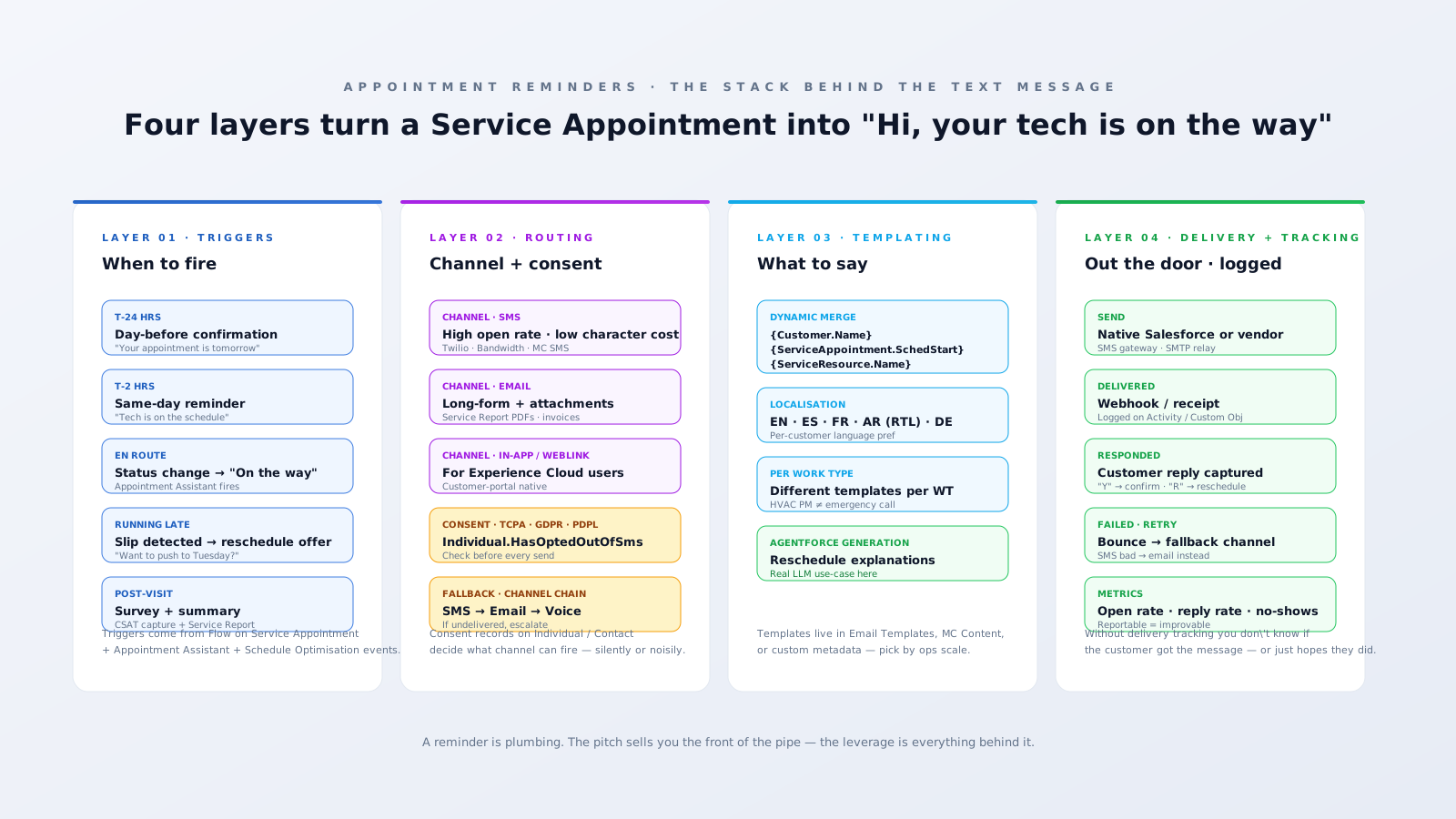
A "no-show" is the symptom. The cure is rarely as simple as "send more reminders." It's an architectural decision about a four-layer messaging stack: when to trigger, what channel to use, what to say, and how to know whether the message actually arrived. Most teams ship layer one and three (a Flow that fires off an email template), call it a reminder system, and wonder why no-shows still hover at 12%. The leverage is in the layers people skip — consent management, channel fallback, delivery tracking, and the localisation rules that decide whether your message is even legible.
This is a complementary post to the Appointment Assistant deep-dive. That one covered customer-facing tracking — "where is my technician right now." This one covers what happens before the technician moves at all: the reminder engine and the architecture that makes it actually work.
The four-layer stack

Layer 1 — Triggers (when to fire)
Industry consensus on a working cadence is roughly: T-24h confirmation, T-2h same-day, en-route, running-late if applicable, and post-visit summary. Each is a different trigger source in Salesforce:
- T-24h, T-2h. Time-based Flows on the
ServiceAppointmentobject — "schedule a paused flow N hours beforeSchedStartTime." Native, no add-on needed. - En-route. Status change on the Service Appointment when the tech taps "Travel" in the mobile app. Appointment Assistant fires the customer-facing experience.
- Running-late. A Flow + Apex check that compares
SchedStartTimeagainst actual technician travel ETA. If the gap exceeds a threshold (say 15 minutes), trigger the reschedule offer. - Post-visit. Triggered when the Service Appointment status flips to "Completed." Sends survey, summary, and the Service Report.
The architectural mistake here is wiring all five triggers off the same Flow. They have different SLAs, different failure modes, and different opt-out rules. Build them as five separate paths so when one breaks (and one will, eventually) the others keep firing.
Layer 2 — Channel routing (and consent)
This is the layer most teams underbuild. Channel selection isn't just a preference — it's a regulatory decision. TCPA in the U.S., GDPR in the EU, UAE/KSA PDPL in the GCC all require documented consent before SMS, and increasingly before automated email. Sending without it is a compliance risk and, in some jurisdictions, a fine per message.
Salesforce models consent on the Individual object (or fields on Contact for orgs that haven't adopted Individual). Useful fields: HasOptedOutOfEmail, HasOptedOutOfSms, HasOptedOutOfTracking. Architectural step: every send is gated by a check on those fields. Don't treat them as a UI hint — treat them as a hard precondition.
Beyond consent, channel choice usually goes:
- SMS. Highest open rate (~98% within 3 minutes per industry benchmarks). Best for time-critical reminders. Costs ~$0.0075/segment via Twilio in the US, more elsewhere. Use Salesforce-native Messaging, Marketing Cloud Engagement (MC Mobile Studio), or a direct Twilio integration via Apex callout.
- Email. Long-form content, attachments (Service Reports, invoices), longer message body. Cheap, but lower open and conversion rates than SMS.
- In-app / Experience Cloud. If your customers have a portal account, surface reminders natively in their portal feed and via push notifications.
- Voice. The fallback when SMS fails and the appointment value is high. Twilio Voice with TTS, or an outbound dial through your contact-centre platform.
The architectural pattern that earns its keep: channel chain with fallback. Try SMS first. If it bounces or returns no delivery receipt within X minutes, retry on email. If email bounces too, escalate to dispatcher for a phone call. This is not native — it's a Flow + Apex pattern your SI builds. Without it, undelivered messages silently disappear and you find out when the tech rolls up to an empty address.
Layer 3 — Templating (what to say)
Three sub-decisions:
Per-Work-Type templates. An emergency outage reminder shouldn't read like a residential PM reminder. The variable that drives template selection is usually WorkOrder.WorkType — surface that on the Service Appointment, then route templating off it.
Localisation. If you have customers in multiple languages, templates need to be picked by Contact.LanguageLocaleKey. For RTL languages (Arabic, Hebrew, Urdu), the message body needs to render right-to-left in the customer's SMS app — most do this automatically based on character set, but verify with your gateway. For Salesforce-side rendering on email, ensure the template has the correct dir="rtl" attribute. UAE, KSA, Egypt, Israel — markets where this matters.
Dynamic merge. Standard fields like {!Customer.Name}, {!ServiceAppointment.SchedStart}, {!ServiceResource.Name}. The trap: if the resource isn't assigned yet when the T-24h reminder fires, your message reads "Hi Sara, your technician will arrive at 09:00 tomorrow." Build template logic to fall back to "your technician" when the resource is missing.
Where Agentforce genuinely helps. Reschedule explanations are the canonical use case. When the optimiser shifts an appointment, an LLM can write a customer-friendly message explaining why ("we've had to push your visit to Tuesday because the technician with the right cert is on call this afternoon — apologies for the change") far better than a templated string. This is the layer-3 spot where the AI investment pays back fastest.
Layer 4 — Delivery + tracking (did the message actually land?)
The single biggest reason teams say "we sent the reminder" while customers say "I didn't get one" is that nobody is tracking delivery receipts. SMS gateways and email providers all return delivery webhooks. Capture them on a custom Activity / custom object linked to the Service Appointment. Then build a report: "appointments where the T-24h reminder failed to deliver." That one report alone surfaces a meaningful chunk of the no-show population — usually wrong phone numbers, opted-out customers, or customers whose carriers blocked the message.
The other reason: response capture. If your reminder includes "reply Y to confirm or R to reschedule," you need to capture that reply and act on it. Twilio + Salesforce-native Messaging both surface inbound replies as records. Wire a Flow that:
- "Y" → flips Service Appointment to
Confirmed - "R" → triggers an Agentforce reschedule conversation OR routes to a contact-centre agent
- Anything else → flag for human review
Without this, a customer who replied "yes" still shows up as "didn't respond" in your no-show report. The signal is there; you have to capture it.
The single biggest mistake we see
Teams build layers 1 and 3 well — Flows that fire on schedule, templates with merge fields. Then they assume layers 2 and 4 are "compliance and IT problems," and skip them. That's where 90% of no-show problems live. Reminders that don't check consent, don't fall back to a second channel, don't verify delivery, and don't capture replies aren't a reminder system — they're an aspirational broadcast.
A pragmatic build order
- Pick your channels. Most operations: SMS primary + Email fallback. Voice for high-value appointments. Skip WhatsApp/Messenger unless you have a regional reason to use them.
- Build the consent layer first. Wire
HasOptedOutOfSms/HasOptedOutOfEmailas a hard precondition on every send Flow. Audit the existing Contact/Individual records — most orgs have hundreds with stale consent flags. - Build T-24h and T-2h triggers. Native Salesforce Flows. No add-on needed.
- Wire SMS via your gateway of choice. Twilio is the default for North America; check carrier coverage in your operating regions before locking in.
- Add delivery tracking. Webhook ingestion via a public site / named credentials → custom record per send. Build a "failed reminders" report.
- Add response capture. Inbound reply → Flow → Service Appointment status update.
- Add fallback channel chain. SMS bounce → email retry → escalate.
- Layer Agentforce for reschedule explanations. Once the deterministic plumbing works.
Most teams reverse this — they buy Agentforce first, build the Flow second, and discover six months in that consent isn't being checked and 8% of their reminders never delivered. Build the boring layers first; the AI value compounds on top of them.
If your no-show rate isn't moving despite "having reminders in place," the leverage is almost certainly in layers 2 and 4 — not in upgrading the LLM. An architecture review usually finds the gap in a single working session. Book the 30-minute one if you want to talk through your specific reminder stack.